Hey folks, if you’re reading this, chances are you’ve hit that annoying, unplanned power outage before—right? Maybe it killed your work laptop mid-presentation, fried your home lab’s drives, or shut down your small business’s POS system right before a busy weekend. I’m gonna cut to the chase: a UPS backup power station isn’t just another gadget. It’s the safety net that keeps your stuff (and sometimes your sanity) running when the grid throws a fit. And as a supplier of these things, I’ve seen way too many people grab the first cheap one they find, only to realize it does jack squat for their needs. Let’s fix that. UPS Backup Power Stations
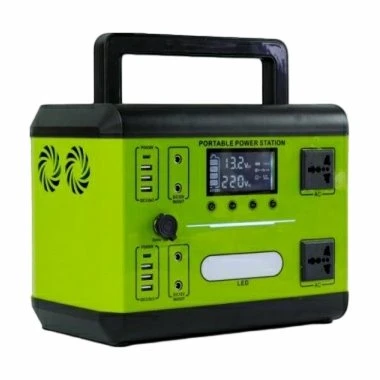
First things first, let’s skip the jargon. I’m gonna keep this real, not throw around terms like “VA rating” or “true sine wave” like they’re passwords you need a PhD for. Let’s start with the big question: what do you actually need powering when the lights go out? That’s non-negotiable. I once had a guy who runs a tiny bakery come to me complaining his UPS only lasted 2 minutes—turns out he plugged in his oven, a fridge, and a space heater all at once, and his $50 unit was never gonna handle that.
So step one: List your critical devices. Be specific. Do you need it for a bedroom Wi-Fi router and a smart thermostat (super low-power, like 100-200 watts total)? Or are you a freelancer with a desktop PC, external monitor, and a NAS (that’s 500-800 watts easy)? Maybe you’re a home office worker who needs your whole setup, plus a modem—closer to 1,000 watts. If it’s a small retail spot? You might need the POS, a cash register, and maybe a display case—1,200+ watts. Write all those down, add ’em up. That’s your baseline wattage. Don’t forget to add a 20% buffer, too. Power surges when the grid kicks back on are real, and that extra 20% keeps you from overloading the unit.
Next, what about runtime? This is where people mess up. Your buddy might brag his UPS lasts 2 hours, but that’s only if it’s powering a modem, not a gaming PC and a PS5. Runtime depends on two things: your wattage and the battery capacity of the UPS. Let’s be honest—do you need 8 hours of backup? Probably not. Most outages here last 15 mins to an hour. If you’re in an area with super frequent, long outages (like rural areas or places with bad utility infrastructure), then you might want a bigger battery. If you’re in a suburb where outages rarely hit 30 mins, a mid-sized unit will do. Quick hack: if your total watts are 500, a 1,000 VA (which is basically equal to watts for basic use) unit will give you roughly 15-20 mins of runtime. If you need more, go for a 1,500 VA, but remember—bigger battery means bigger, heavier, and more expensive. Don’t overdo it just in case.
Now, the types of UPS. Yeah, there are different kinds, and not all are the same. Let’s break ’em down simply. First, there’s Line-Interactive UPS. This is the most common one for home and small offices. It’s cheap, it handles small power dips (like when the grid drops a little voltage) without even switching to battery. It’s perfect for your Wi-Fi, PC, small appliances. Then there’s Online Double-Conversion UPS. This one’s for heavy stuff—like servers, medical equipment, or industrial gear. It’s always converting power, so there’s no lag when the grid goes out. But it’s pricier, and uses more energy even when it’s just sitting there. If you’re not running a data center or a doctor’s office, skip this. Oh, and there’s Standby UPS—cheapest, but it only switches to battery when the power dies. That tiny switch might take a millisecond, but for super sensitive stuff (like a NAS with important data), that millisecond could be enough to corrupt files. So unless you’re powering a lamp, go with Line-Interactive at minimum.
Wait, what about outlets? That’s another easy miss. Look at how many outlets you need, and what types. A lot of budget UPS units only have a few standard 3-prong outlets, but if you have a laptop charger, a monitor, and a modem, you might need 4-6. Also—some outlets are “surge-only” and some are “battery backup + surge.” Don’t plug your important stuff into the surge-only ones! That’s just a fancy power strip with a sticker. The battery backup outlets are the ones that keep running when the grid dies. I’ve had a customer plug his desktop into a surge-only outlet during an outage—lost all his unsaved work. Ouch.
Then, extra features that actually matter. Let’s not waste time on gimmicks. Things like USB charging ports for your phone or tablet while the UPS is running? Cool, but not necessary. What you do want: A LCD screen that shows actual power usage, runtime left, and battery health. That way you don’t guess if your battery is dead. Also, software—most good UPS units work with Windows, Mac, or even your router to shut down your computer/network safely if the outage lasts longer than the battery can handle. No more hard shutoffs that mess up your drives. Oh, and warranty. A good UPS should have at least a 1-year warranty on the unit, and 2-3 years on the battery. Some mid-range units have 5-year warranties—worth the extra cash. Avoid anything with a 6-month warranty, that’s a red flag.
Wait, what about portability? If you’re moving the UPS a lot (like a freelancer who takes it to co-working spaces), look for a smaller, lighter unit. Most 1,000 VA units are around 15-20 lbs, so that’s manageable. Big 2,000 VA units are 30+ lbs, so leave that for a fixed home office or small retail spot.
Now, let’s talk budget. I’m not gonna lie—you get what you pay for. A $30 UPS for your router is fine, but that’s it. Don’t use that for your gaming PC. For a home office with a desktop, monitor, and NAS, you’re looking at $100-$200. For a small retail spot with POS equipment, $200-$350. Industrial or medical? $500+, but that’s non-negotiable. I’ve had customers come back to me because they bought a $50 “deal” UPS that died after 6 months—replacing it cost them more than just getting the right one the first time.
Mistakes I see all the time: Skipping the wattage buffer. Plugging too many high-watt devices into the UPS (like space heaters, microwave ovens, those are way too much for any consumer UPS). Forgetting to replace the battery when it dies—most UPS batteries last 3-5 years, so even if the unit works, the battery might need swapping. A lot of people don’t know that—they think the whole unit is dead, but it’s just the battery.
So, to wrap this up, here’s your quick checklist: 1) Add up the watts of your critical devices, add 20%. 2) Pick a UPS type: Line-Interactive for home/small office, Online for heavy use. 3) Match VA (or kVA for bigger setups) to your total watts plus buffer. 4) Check the number of outlets—make sure there are enough battery backup ones. 5) Look for a warranty of at least 1 year, and useful features like runtime displays. 6) Budget appropriately—don’t go too cheap, but don’t overspend on stuff you don’t need.
If you’re still confused, that’s totally normal. A lot of people get stuck on calculating watts or picking the right runtime. That’s what I’m here for. As a supplier, I’ve helped tons of folks narrow down exactly what works for their space, whether it’s a 1-bedroom apartment Wi-Fi setup or a 5-person small business. No pushy sales, no confusing jargon—just straight answers.

If you’re ready to find the right UPS backup power station for your needs, reach out to my team for a personalized chat. We can walk through your device list, calculate the perfect runtime, and make sure you get something that fits your budget without wasting money on extra features you’ll never use.
Trolley Heavy-Duty Power Stations 4000W–5000W REFERENCES
- U.S. Department of Energy. “Backup Power Solutions for Residential and Small Commercial Applications.” Energy.gov, 2023.
- International Electrotechnical Commission. “Standard for Uninterruptible Power Supply (UPS) Systems.” IEC 62040-1, 2022.
- Consumer Reports. “How to Choose an Uninterruptible Power Supply (UPS) for Your Home Office.” ConsumerReports.org, 2024.
- Local Electric Reliability Council. “Outage Frequency and Duration Trends in North American Residential Areas.” North American Electric Reliability Corporation, 2023.
Guangdong Joinwin Global Digital Intelligence Technology Co., Ltd.
As one of the most professional UPS backup power stations manufacturers in China, we have world-leading production equipment and strong manufacturing capabilities. Please rest assured to buy high quality UPS backup power stations from our factory. Customized orders are welcome.
Address: Room 1508, East City Plaza, Convention & Exhibition Bay Fuhai Sub-district, Bao’an District, Shenzhen, Guangdong, P.R. China
E-mail: bruceyang@joinwinenergy.com
WebSite: https://www.joinwinpower.com/
